Part 4 · Comfort, Lighting & Your Truck
Climate (HVAC)
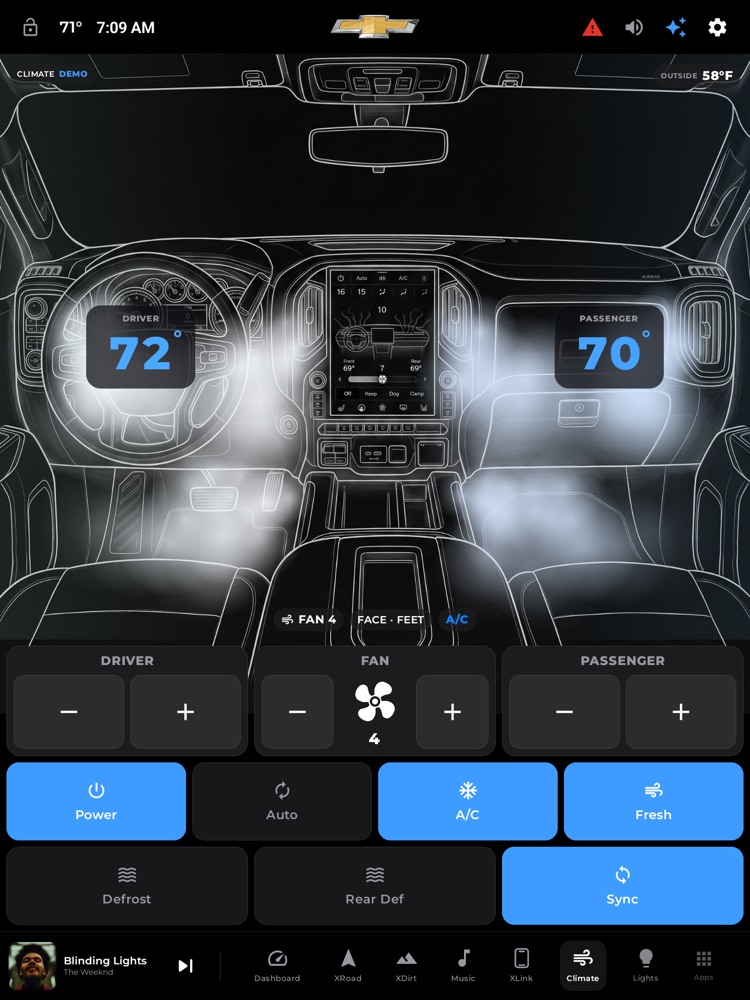
The Climate page: dual-zone temps, fan, the airflow visualization, and control toggles.
Your truck's climate control, right on the big screen — and it's the real thing, not a copy. xOverland reads your actual heating and cooling from the truck and lets you change it with generous, fat-finger buttons you can hit without looking. Turn a knob on the factory panel and the screen updates instantly; tap the screen and the truck responds. It's one climate system, shown two ways.
Where to find it: Bottom dock › Climate tab (the fan/air icon)
When you'll use it: Any time you want to warm up, cool down, defog the windshield, bump the fan, or just glance at what the cabin is doing — all without hunting for the small factory buttons. It's especially handy on the move, when big targets matter.
The screen, part by part
The page is split top-and-bottom: a live picture of your cab up top, and a wall of big controls below.
Top half — the airflow picture
- The cab sketch. A clean line drawing of your dashboard fills the top. It automatically flips to a bright-on-dark look at night and back to dark-on-light by day, matching the rest of xOverland.
- Airflow plumes. Soft colored streams of "air" billow out of whichever vents are actually blowing — up the windshield, out toward your face, or down at your feet. They're tinted by temperature: cool blues when you're set cold, warming through white and yellow to red as you turn up the heat, with the driver side and passenger side each colored to their own setting. Turn the fan up and the air moves faster and thicker; turn the fan fully off and the plumes disappear entirely, because nothing is blowing.
- DRIVER and PASSENGER temperature cards. Two large number cards sit over their side of the cab — driver over the wheel, passenger over the glovebox. Each shows that side's set temperature in big digits (with the degree mark), colored on the same cool-to-warm scale. If that seat's heater or cooler is on, a small seat badge with a level (SEAT 1–3) appears right under the number. When climate is off, the cards read "--".
- OUTSIDE pill (top-right). Shows the outdoor temperature reported by the truck. It stays visible even when the climate system is off. If the truck isn't reporting one, the pill simply doesn't appear.
- Status pills (bottom of the picture). A row of small readouts summarizes what's happening: a fan pill (FAN AUTO, FAN 3, or OFF), an airflow pill listing the active directions (FACE · FEET · WINDSHIELD), and an A/C pill that lights up blue when the compressor is on.
- Heated-wheel glow. If your truck has a readable heated steering wheel and it's on, a soft warm glow gently pulses over the wheel in the sketch. (See "What you need" — this truck doesn't expose that, so you won't normally see it here.)
Bottom half — the controls
The top row of controls is three big cards:
- DRIVER card. The zone title over two large – and + buttons. Each tap nudges the driver's temperature down or up one degree. The number itself lives in the big card above, so there's no clutter or duplication.
- FAN card. A large – and + on either side of a spinning fan graphic and the current speed (0–8, or AUTO). The fan spins faster as the speed climbs, and sits still when it's off — an at-a-glance read of how hard it's blowing.
- PASSENGER card. Same as the driver card, for the passenger's side.
Below that, a grid of big square toggle tiles. Each shows an icon and a label and switches on with a filled, brightened look:
- Power — turns the whole climate system on or off.
- Auto — hands fan and airflow back to the truck's automatic mode.
- A/C — the air-conditioning compressor (cooling / dehumidifying).
- Fresh / Recirc — one button that flips between pulling in outside air ("Fresh") and recirculating cabin air ("Recirc"). The label and icon change to show which mode you're in.
- Defrost — max front windshield defrost.
- Rear Def — rear-window defroster.
- Sync — links the driver and passenger temperatures so setting one sets both.
If your vehicle has extra comfort features, more tiles appear automatically: ECO mode, a Wheel (heated steering wheel) tile, and a bottom row of heated / cooled seat tiles (driver and passenger, each with a 1-2-3 level shown as three dots). On this 2022 Silverado Trail Boss those aren't fitted, so those tiles are hidden — the page only ever shows controls your truck actually has.
How to change a temperature
- Open the Climate tab.
- On the DRIVER or PASSENGER card, tap – to cool that side or + to warm it.
- Watch the big number card above update, and the airflow tint shift toward blue or red. A brief confirmation flashes near the top (e.g. "Driver 72°F").
- Want both sides to match? Turn on Sync first, then set one — the other follows.
How to turn on the A/C and pick fresh vs. recirculated air
- Make sure Power is on.
- Tap A/C — the tile fills in and the A/C pill on the picture turns blue.
- Tap the Fresh / Recirc tile to choose your air source. "Fresh" pulls in outside air; "Recirc" keeps recirculating cabin air (great for cooling fast or keeping out road smells).
How to clear a foggy or icy windshield
- Tap Defrost for full-force windshield defrost.
- Tap Rear Def to clear the back glass.
- Tap either again to turn it back off.
How to use the quick climate pop-up from the Dashboard
You don't always have to leave the home screen to nudge the climate.
- On the Dashboard, find the climate tiles along the bottom (DRIVER, FAN, A/C, PASSENGER).
- Tap one — a centered pop-up opens with just that control (the temperature card and its buttons, the fan, or a big A/C on/off).
- Adjust it, then tap the X in the corner or tap anywhere outside the pop-up to close. Everything you change here goes straight to the truck, exactly like the full Climate page.
What you need
The Climate page is powered by your truck's own climate system through the aftermarket head unit's connection to the vehicle. What that means for you:
- Live reading and control require the head unit to be wired to the truck's data connection and the ignition at least in ACC. When it's fully connected, xOverland both shows the real climate state and sends real button presses — the same presses the factory panel makes, so the two never disagree.
- Before that's ready, the page shows a friendly "Waiting for climate data" message: "Turn the key to ACC and the truck's climate system will appear here." Turn the key and it comes to life.
- If the data connection is present but controls can't transmit (for example on a bench/preview setup), the page still shows everything live but in a look-but-don't-touch state — the buttons dim and won't send. On a fully installed truck, controls are active.
- Some buttons are display-only on this truck. Sync (and, on vehicles that have them, ECO and the heated wheel) don't have a factory press to send on the Silverado's climate profile, so xOverland will show their real state but can't toggle them from the screen — use the physical control for those. Everything else (power, temps, fan, A/C, fresh/recirc, defrost, rear defrost) sends a genuine command.
- No subscription, account, or API key is needed — this is your truck talking to your screen.
Tips & good to know
- It stays in sync both ways. Turn a knob or press a button on the factory climate panel and the screen updates to match. Whatever changes it — you, the factory panel, or the truck itself — a little confirmation toast slides down from the top for a couple of seconds (like "A/C On" or "Fan Speed 4"), so you always get a nod that it landed.
- Fan off means no wind. When the fan is at 0, the airflow plumes vanish completely — an honest picture, not decoration.
- Colors carry meaning. Cooler settings read blue, warmer settings read red, on both the numbers and the airflow, so you can gauge each side at a glance without reading the digits.
- Presses are made to stick. Each tap sends a properly-timed press to the truck, so a single tap reliably registers instead of needing a double-press.
- Day and night, automatically. The whole page — sketch, cards, and pills — adapts to the truck's day/night setting to stay easy on the eyes.
- Everything is oversized on purpose. The temperature and fan buttons are half-card-sized targets, so you can adjust the cabin while driving without fumbling for a tiny control.